How to read your payslip, line by line (with a labelled example)
Most of us look at one number on a payslip: the one at the bottom. That makes sense, because it’s the number that pays the rent. But everything above it is there for a reason, and when something goes wrong with your pay, it’s almost always visible on the payslip weeks before you’d notice it any other way.
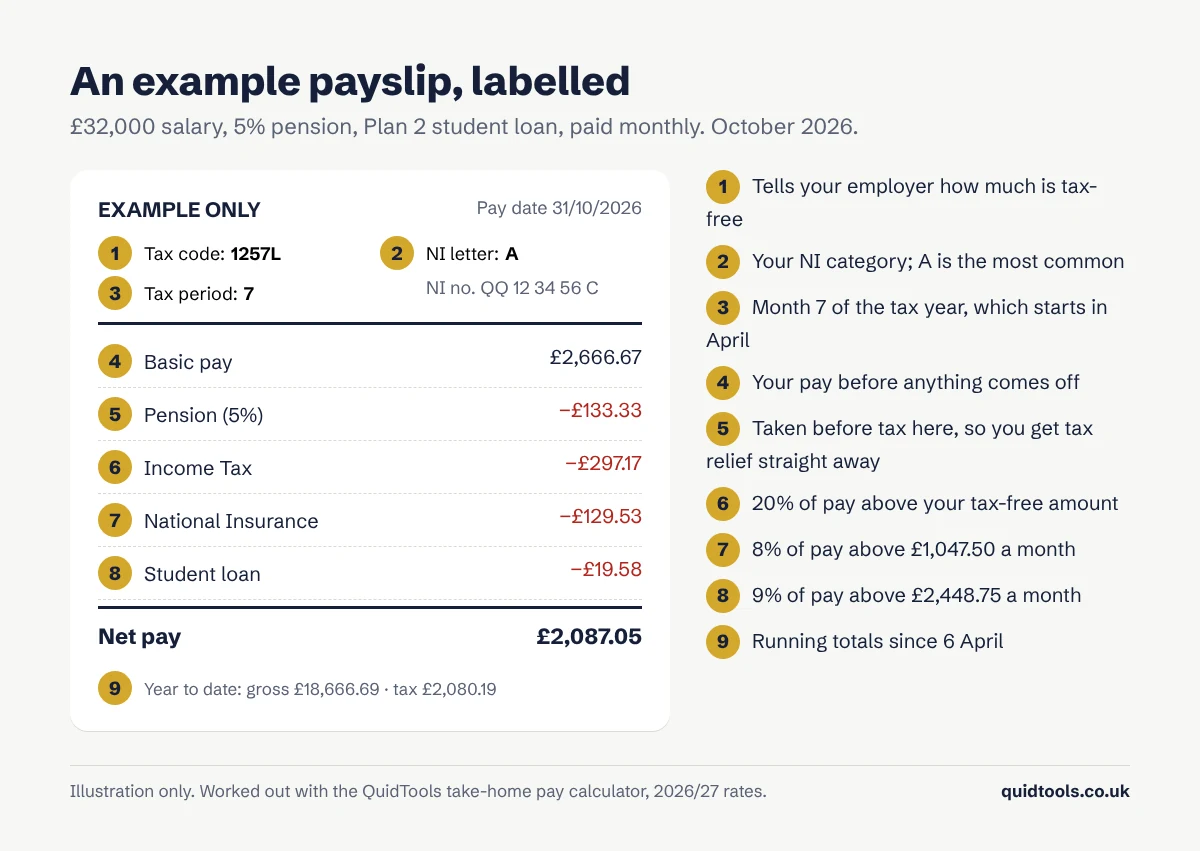
Payslips look different from one employer to the next, but they all carry the same information. Here’s an example, labelled, and then what each part means.
The details at the top
Your tax code tells your employer how much of your pay is tax-free. For most people it’s 1257L. If yours is different, it’s worth knowing why. I’ve written a separate guide to reading your tax code, including the ones that usually mean something’s wrong.
Your National Insurance number and letter. The number is yours for life. The letter is your NI category, and nearly everyone is on A. You might see M if you’re under 21, H for an apprentice under 25, or C if you’ve reached State Pension age and no longer pay employee NI.
The tax period shows where you are in the tax year, which runs from 6 April to 5 April. Month 1 is April, so an October payslip shows period 7. Weekly payslips count in weeks instead, from 1 to 52.
Pay: what you earned
This is your gross pay, before anything comes off. On a salary it’s usually your annual pay divided by twelve. Overtime, bonuses, commission, sick pay and holiday pay all appear as separate lines here, which makes it easy to check you’ve been paid for that extra Saturday.
Deductions: what comes off
Pension. If you’re in a workplace pension, your contribution comes off here. How it’s taken matters. In the example it comes off before tax is worked out, so you get your tax relief straight away and pay less Income Tax. Some schemes take it after tax and the pension provider claims the relief for you instead, and with salary sacrifice it doesn’t appear as a deduction at all, because your gross pay is simply lower. Your employer’s contribution often isn’t shown on the payslip, but it’s still going in.
Income Tax. This year it’s 20% on what you earn above your tax-free allowance, up to £50,270, then 40% above that. On a monthly payslip your allowance is spread evenly, so about £1,047.50 of each month’s pay is tax-free.
National Insurance. You pay 8% on earnings between £1,047.50 and £4,189.17 a month, and 2% on anything above. Unlike Income Tax, it’s worked out on each payday separately, which is why a big bonus month can take more NI than you’d expect.
Student loan. Repayments are 9% of what you earn over your plan’s threshold, which for Plan 2 is £29,385 a year, or £2,448.75 a month. If you don’t see a student loan line and think you should, check with the Student Loans Company, because underpayments get collected later.
You might also see deductions for things like a cycle-to-work scheme, union fees, a charity you give to through payroll, or repaying an advance.
Net pay and the year-to-date figures
Net pay is what actually lands in your account. In our example, £2,666.67 becomes £2,087.05 once everything is taken off.
The year-to-date boxes are the part people skip, and they’re more useful than they look. They show your running totals for pay, tax and NI since 6 April. If your tax-to-date looks too high for the pay-to-date next to it, that’s often the first sign of a wrong tax code. The same figures appear on your P60 at the end of the year and on your P45 if you leave.
Things worth checking every month
- The tax code is the same as last month, or you know why it changed.
- Your hours and any overtime match what you actually worked.
- The pension percentage is the one you chose.
- There’s a student loan deduction if you should have one, and not if you’ve paid it off.
- Holiday or sick pay looks right if you took time off.
If something doesn’t add up, ask your payroll or HR team first. Pay mistakes are common and usually fixed in the next pay run. Tax code problems are the exception: those go to HMRC, not your employer.
Check your payslip against our calculator
Put your salary, pension and student loan plan into our take-home pay calculator and set it to Monthly. It shows the same lines as your payslip, so you can compare them side by side. If you’re paid by the hour, the part-time pay calculator works from your hourly rate and hours instead.
This is general information. Figures use 2026/27 rates for England, Wales and Northern Ireland. Payroll software rounds some figures differently, so your payslip may be a few pence out from our example.